Free Client File Name Standardiser (Python)
ZIP Pack Runs locally — files stay private

What this is
Who it's for: Freelancers who need a client file name standardiser
A Python command-line tool that renames files to a Client_Project_Date pattern, with a dry-run mode that previews changes first. For freelancers tidying messy client folders.
Free in full — download it and use it on your own freelance work.
Terminal tool: you run it from a terminal (command line) — the README inside the download gives the exact command.
User manual
- Back up the folder first, or test on copies.
- Run with --dry-run to preview the new names without changing anything.
- Run again without --dry-run to apply the renames.
- Check the renamed files match the Client_Project_Date pattern.
- Use --client and --project to set the names used in every file.
Requirements
Python 3.8 or later. No extra packages needed.
Download details
Format: Python script
What is inside: standardise_names.py (Python standard library only), README.txt with examples.
This download is one ZIP containing the Python file plus the README. Unzip it, then run the tool with Python 3 — the README inside the zip gives the exact command.
Download free — client-file-name-standardiser.zip (1.2 KB)
How to run this tool, step by step →
Safety: this tool runs locally on your own computer in plain Python — your files stay private and nothing is uploaded.
- client-file-name-standardiser.zip — 1.2 KB
Questions
What does client file name standardiser do?
A Python command-line tool that renames files to a Client_Project_Date pattern, with a dry-run mode that previews changes first.
What files do I get?
The download is client-file-name-standardiser.zip.
What do I need to open or use it?
Python 3.8 or later. No extra packages needed.
Does it delete files?
No. It only renames files in the folder you point it at. Nothing is deleted.
What date does it use?
Each file's last-modified date, in YYYY-MM-DD format, so the name reflects when the file was last worked on.
What it actually looks like
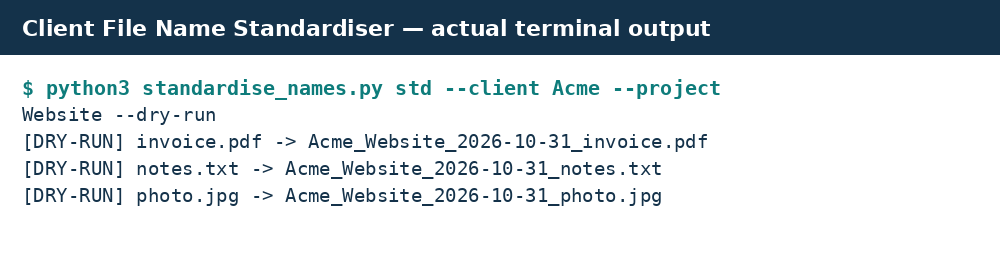
Real preview: actual terminal output from running the tool.