Free Site Visit Report Template — Word
Word
What this is
Who it's for: Freelancers who need a site visit report template
A site visit report template for engineers and site managers, in Word format, that records observations, photo slots and follow-up actions from a visit.
Free in full — download it and use it on your own freelance work.
The site visit report template is a free Word template that records observations, photo slots and follow-up actions from a visit for engineers and site managers.
The site visit report template is a free Word template that records observations, photo slots and follow-up actions from a visit for engineers and site managers. A site visit produces facts that decay fast: by the next morning, which crack was in which wall and who promised what are already blurring. The template captures them the same day, with observations, a photo section that ties each photo to a location and a note, and a list of follow-up actions with owners, so the visit becomes a document instead of a memory.
How to use it. Open site-visit-report-template.docx in Word, LibreOffice Writer or Google Docs and fill in the visit details and attendees first, so the report can never be mistaken for another visit's notes. Write the observations and issues found while they are fresh, then list the photos taken and the actions required, giving each photo its number, its location and what it shows, so the reader can match photos to notes without guessing. Sign the report and send it to the client and to anyone responsible for a listed action, because an action nobody received is an action nobody does.
Worked example. An engineer visits a house extension and finds a damp patch on the north wall, a door frame out of level, and a delivery of blocks stored where the scaffold needs to go. She photographs each issue, notes the location of each photo in the report, and lists three actions: the builder investigates the damp source, the carpenter rechecks the frame, and the blocks are moved before Monday. The signed report goes to the client and to the builder the same day. A week later, when the client asks what was agreed, the answer is on one page with photos to match, instead of in three people's differing memories of the visit.
The template is free in full, with no checkout and no account. If a download fails or a file arrives damaged, email tariqshahzad88@gmail.com and the file will be re-sent, and if a product does not work as described it will be fixed or replaced within 7 days.
Questions
Q: What does site visit report template do?
A: A site visit report template for engineers and site managers, in Word format, that records observations, photo slots and follow-up actions from a visit.
Q: What files do I get?
A: The download is site-visit-report-template.docx.
Q: What do I need to open or use it?
A: A word processor such as Word, LibreOffice Writer or Google Docs.
Q: What goes in the photo section?
A: Each photo number, its location and what it shows, so the reader can match photos to notes.
Q: Who gets the report?
A: The client and anyone responsible for a listed action.
User manual
- Open the document
- Fill in visit details
- Write observations
- List photos and actions
- Sign and send to the client
Requirements
A word processor such as Word, LibreOffice Writer or Google Docs.
Download details
Format: Word
What is inside: A Word document with visit details, observations, a photo record table, an actions table and sign-off lines.
Download free — site-visit-report-template.docx (36.4 KB)
- README.txt — 434 B
- site-visit-report-template.docx — 36.4 KB
Questions
What does site visit report template do?
A site visit report template for engineers and site managers, in Word format, that records observations, photo slots and follow-up actions from a visit.
What files do I get?
The download is site-visit-report-template.docx.
What do I need to open or use it?
A word processor such as Word, LibreOffice Writer or Google Docs.
What goes in the photo section?
Each photo number, its location and what it shows, so the reader can match photos to notes.
Who gets the report?
The client and anyone responsible for a listed action.
Related products
What it actually looks like
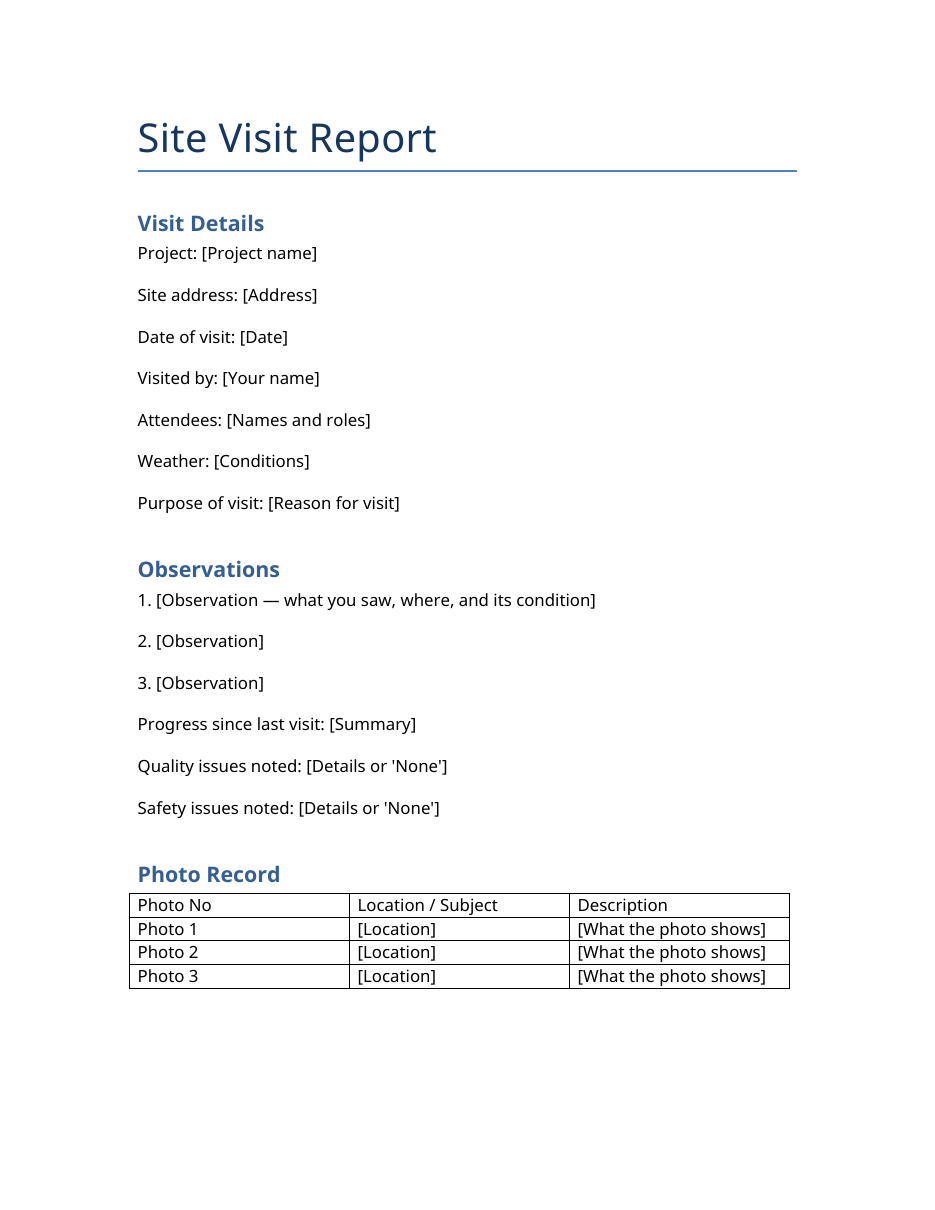
Real preview rendered from the actual file (downloads/site-visit-report-template/site-visit-report-template.docx).