Free Duplicate Photo Finder (Python)
ZIP Pack Runs locally — files stay private

What this is
Who it's for: Freelancers who need a duplicate photo finder
A Python command-line tool that finds duplicate and near-identical images by file size and content hash. For freelancers freeing disk space from repeated photos.
Free in full — download it and use it on your own freelance work.
Terminal tool: you run it from a terminal (command line) — the README inside the download gives the exact command.
User manual
- Point the tool at a folder of images.
- Run: python3 find_duplicates.py photos/
- Read the report: exact duplicates share size and content hash.
- Check same-size groups flagged as possible near-duplicates before deleting.
- Delete only files you have confirmed are duplicates.
Requirements
Python 3.8 or later. No extra packages needed.
Download details
Format: Python script
What is inside: find_duplicates.py (Python standard library only), README.txt.
This download is one ZIP containing the Python file plus the README. Unzip it, then run the tool with Python 3 — the README inside the zip gives the exact command.
Download free — duplicate-photo-finder.zip (1.3 KB)
How to run this tool, step by step →
Safety: this tool runs locally on your own computer in plain Python — your files stay private and nothing is uploaded.
- duplicate-photo-finder.zip — 1.3 KB
Questions
What does duplicate photo finder do?
A Python command-line tool that finds duplicate and near-identical images by file size and content hash.
What files do I get?
The download is duplicate-photo-finder.zip.
What do I need to open or use it?
Python 3.8 or later. No extra packages needed.
Does it delete duplicates automatically?
No. It only reports groups. You decide what to delete, so nothing is lost by accident.
What counts as near-identical?
Files with the same size and dimensions are flagged as possible duplicates for you to check visually, even if their bytes differ.
What it actually looks like
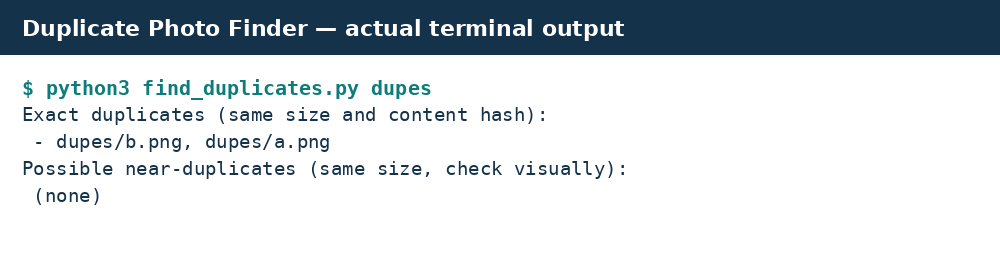
Real preview: actual terminal output from running the tool.