Free Folder-to-Excel Inventory Reporter (Python Tool)
ZIP Pack Runs locally — files stay private

What this is
Who it's for: Freelancers who need a folder-to-excel inventory reporter
Every file in a folder, listed and measured in one scan — filename, type, size and date, straight into Excel. Free python tool tool for freelancers — download it free and use it on your own work.
Free in full — download it and use it on your own freelance work.
No coding required — double-click to open its friendly window.
User manual
- Download the file from the Download section below.
- Open it in the app listed under Requirements.
- Save a copy for your own work before you start editing.
- Replace any bracket fields or example rows with your own details.
- Use it on a real job and keep the finished copy with the project file.
Requirements
Python 3 on Windows, Mac or Linux — see the README inside the download for the exact steps.
Download details
Format: ZIP Pack
What is inside: folder-inventory-reporter-full-v1.0.zip
This download is one ZIP containing the Python file plus the README. Unzip it, then run the tool with Python 3 — the README inside the zip gives the exact command.
Download free — folder-inventory-reporter-full-v1.0.zip (4.0 KB)
How to run this tool, step by step →
Safety: this tool runs locally on your own computer in plain Python — your files stay private and nothing is uploaded.
Questions
What does folder-to-excel inventory reporter do?
Every file in a folder, listed and measured in one scan — filename, type, size and date, straight into Excel.
What files do I get?
The download is folder-inventory-reporter-full-v1.0.zip.
What do I need to open or use it?
Python 3 on Windows, Mac or Linux — see the README inside the download for the exact steps.
What if the download fails or a file arrives damaged?
Email tariqshahzad88@gmail.com and the file will be re-sent. If a product does not work as described, email within 7 days and it will be fixed or replaced — everything here is free.
Related products
What it actually looks like
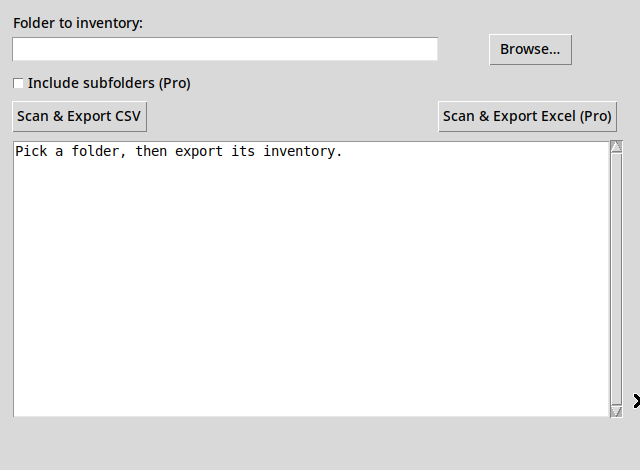
Real preview: screenshot of the actual tool window, captured while running the tool.